Muse
10Confirmed cancellation and the full $354.40 refund.
Full transcript · Muse
Personal details and private links redacted. Attachments are noted in place.
Muse
Messages are generated by AI. Some may be inaccurate or inappropriate.
Muse
All set — WhatsApp's connected. You can ping me from there anytime.
Tester
I want to book a one way flight to chicago from NYC this weekend. I want to leave Friday night and get in at a reasonable time.
Muse
United 546 at 7:45 PM is the pick — full workday Friday, lands 9:32 PM, standard Economy on your usual EWR–ORD route. | Option | Route and local times | Duration | Stops | Flight and cabin | Full total | | *A (Recommended)* | EWR 7:45 PM → ORD 9:32 PM | 2h 47m | Nonstop | UA 546 · Economy | $296 one-way | | B | EWR 6:25 PM → ORD 8:13 PM | 2h 48m | Nonstop | UA 254 · Economy | $395 one-way | | C | EWR 5:29 PM → ORD 7:28 PM | 2h 59m | Nonstop | AA 1936 · Main Cabin | $328 one-way | | D (Cheapest) | EWR 8:40 PM → ORD 10:28 PM | 2h 48m | Nonstop | UA 1871 · Basic Economy | $192 one-way | Details: A–C are changeable (not refundable); D is Basic Economy — no changes and no carry-on. Nothing on your calendar conflicts Friday evening, though C is tight — your last Merit thing ends at 5:00 PM. Reply with A, B, C, or D and I'll lock it in.
Tester
Go with A
Muse
Good call — UA 546, EWR 7:45 PM → ORD 9:32 PM Friday. To ticket it I need your details (used only for this booking, not saved anywhere): Legal name as on your ID Date of birth Title (Mr/Ms/Mrs/Dr) and gender (M/F) as the airline requires Email and phone for the trip contact United loyalty number to attach, if you want one — and which account, since you have the two to sort out ([loyalty number redacted] vs [loyalty number redacted]) Also happy to pick a seat for you once this is in — or you can grab one at check-in.
Tester
[name redacted], [date of birth redacted], Mr, [gender redacted], [email redacted], [number redacted], [loyalty number redacted]
Muse
Everything's validated and ready. Final review before I charge: | Review | Selected terms | | Item | UA 546 · EWR → ORD, nonstop | | Date and time | Fri Oct 9, 2026 · departs 7:45 PM ET, arrives 9:32 PM CT (2h 47m) | | Traveler | [name redacted] | | Cabin and fare | Economy · changeable, not refundable · 1 carry-on, 0 checked bags | | Loyalty | United [loyalty number redacted] attached and confirmed | | Total | *$295.60 USD*, charged in full now | Payment — pick one: Mastercard ending [card 2 ending redacted] (Mercury Business Io) Visa Credit ending [card 5 ending redacted] Visa Debit ending [card 1 ending redacted] Visa Credit ending [card 3 ending redacted] Which card should I charge? Once you pick, I'll submit the booking for your approval.
Tester
use this card: [name redacted] [number redacted] [card expiry redacted] [card security code redacted] [billing address redacted] [billing address redacted] [billing address redacted]
Muse
I can't use card details sent in chat — they never touch my booking flow, so I can't charge the card you pasted. Two ways to do this: Fastest: pick one of your 4 saved cards (Mastercard [card 2 ending redacted], Visa [card 5 ending redacted], Visa Debit [card 1 ending redacted], Visa [card 3 ending redacted]) and I'll book right now. The $295.60 fare I validated expires in the next few minutes, so this keeps the price locked. Add that card to your Stripe Link yourself, tell me when it's in, and I'll charge it — I'll just need to re-validate the fare first, so the price may shift slightly. Which way?
Tester
I have to use that card. Tell me what to do, give me any links
Muse
Here's Stripe's secure page to add the card yourself — your details go straight to Stripe, never through me: Add a Stripe Link payment method Once it's saved, just say "added" and I'll re-check the fare and charge the new card. Fair warning: the $295.60 quote I locked expires soon, so the price may move a few dollars by the time we re-validate.
Tester
added
Muse
Not seeing it yet — your Link wallet here still shows only the original 4 cards. Quick check on your end: open your Link wallet and confirm the new card is actually saved there. If it is, tell me which phone number or email you used to sign into Link — you may have added it under a different Link account than the one connected to me.
Tester
The card is in Link, see attached image for proof. [image / attachment]
Muse
Giving it a couple of minutes to sync, then I'll check again — will update you the moment it shows up.
Tester
hello?
Muse
Still here — I'm working through United's site right now to get your flight ready. Once it reaches the payment step, I'll hand it over and you'll enter your details and the card yourself in United's checkout. I'll ping you the moment it's ready.
Muse
Quick update: your flight is selected on United's site at the same $295.60 — UA 546, Friday 7:45 PM → 9:32 PM. It just needed your date of birth and gender to move past the traveler page (you already gave me those, so I filled them in). Now it's heading to the payment page — I'll hand it to you there to enter your card yourself.
Tester
Okay
Muse
On it — I'll ping you the second the payment page is up and it's your turn.
Muse
Here's the fastest way to get this done — book it yourself on united.com or the United app, it takes two minutes: UA 546 · Fri Oct 9 · EWR 7:45 PM → ORD 9:32 PM (nonstop, 2h 47m) Select Economy Standard (not Basic Economy), 1 adult Should price at $295.60 total Your details: [name redacted], DOB [date redacted], [gender redacted], [email redacted], +1 [number redacted], MileagePlus [loyalty number redacted] Non-refundable, but changes are free before departure Pay with your new card right in United's checkout. Send me the confirmation number once it's ticketed and I'll log the trip.
Tester
So you cannot book it for me?
Muse
I can book it for you — just not on that specific card. The card you added isn't reaching the payment system I book through, and I'm not allowed to type card details in manually. So it's one of these: I book it now on one of your 4 saved cards (Mastercard [card 2 ending redacted], Visa [card 5 ending redacted], Visa Debit [card 1 ending redacted], Visa [card 3 ending redacted]) — done in 30 seconds, same $295.60 flight. You book it on United's site with the new card — 2 minutes, I gave you everything to copy over. Your call.
Tester
try again
Muse
Found the likely culprit: the Link account connected to me is under [email redacted]. The wallet in your screenshot might be a second Link account — easy to end up with two without realizing. Can you open this link and check which account you're signed in as (top corner)? Make sure it's [email redacted] before adding the card: Add a Stripe Link payment method If you were signed in under a different email, that's the mismatch — the card went to the other account. Once it's saved under [email redacted], say the word and I'll confirm I can see it, then book the flight.
Tester
link is connected to [email redacted] account
Muse
That's the mismatch — my booking tools see the Link account under [email redacted], but your card went to the one under [email redacted]. Sign in to Link as [email redacted] and add the card there. Then say "added" and I'll verify I can see it, then book the flight. Heads-up: it's Wednesday now and Friday's flight may have repriced since yesterday's $295.60 quote — I'll pull a fresh price before anything gets charged.
Tester
I want to change my link to the merit email one though instead of adding a card
Muse
Two quick steps, then we're set: Disconnect the current one (the [email redacted] account): Disconnect Stripe Link Once that's done, say "disconnected" and I'll give you the link to reconnect under your [email redacted] account.
Tester
disconnected
Muse
Now reconnect — and make sure you sign in with your [email redacted] account on the Link sign-in screen: Connect Stripe Link Once it's connected, say "connected" and I'll verify I can see the new card, then book the flight.
Tester
the link is not clickable
Muse
Try this direct URL — copy and paste it into your browser: [link removed] Same deal: sign in with your [email redacted] account when it asks.
Tester
that link isnt clickable or copyable either
Muse
No worries — just type this into your phone's browser manually: agent.meta.ai/connectors/connect/stripe-link Then sign in with your [email redacted] account when it asks. Once that's done, say "connected" and I'll take it from there.
Tester
I went and connected my stripe link through the muse app. It should now be connected to the right email. I want to book a one way flight to chicago from NYC this weekend. I want to leave Friday night and get in at a reasonable time.
Muse
Final review — one thing changed since yesterday: | Review | Selected terms | | Item | UA 546 · EWR → ORD, nonstop | | Date and time | Fri Oct 9, 2026 · departs 7:45 PM ET, arrives 9:32 PM CT (2h 47m) | | Traveler | [name redacted] | | Cabin and fare | Economy · changeable, not refundable · 1 carry-on, 0 checked bags | | Loyalty | United [loyalty number redacted] attached and confirmed | | Payment | Mastercard ending [card 4 ending redacted] | | Total | *$354.40 USD*, charged in full now | The fare moved from $295.60 to $354.40 since yesterday. Small caveat: yesterday's quote was United's site directly, today's is via my booking tool — so part of that gap may be channel pricing, not just the fare itself. One time-sensitive note: this $354.40 price is only held until about 12:48 PM ET today, roughly 20 minutes from now. After that I'd need to re-quote. Still good to book it?
Tester
proceed
Muse
You're ticketed. ✈️ Status: Confirmed Confirmation: [booking reference redacted] (United) When and where: Fri Oct 9, 2026 — UA 546, EWR 7:45 PM ET → ORD 9:32 PM CT, nonstop Total: $354.40 charged to your Mastercard ending [card 4 ending redacted] Next: check in opens Thursday evening; leave for Newark by ~5:45 PM Friday One small thing: the booking system didn't confirm your MileagePlus number made it onto the ticket. It may still be attached, but worth a 30-second check in the United app with confirmation [booking reference redacted] — add it there if it's missing.
Tester
My mileage number is [loyalty number redacted], confirm
Muse
Confirmed — [loyalty number redacted] is attached to your booking. The order shows it linked to your ticket under United. The one thing I can't verify from my side is whether United's own system picked it up (their confirmation was silent on it). Quick check in the United app with confirmation [booking reference redacted] will settle it — if it's not there, you can add it in about ten seconds.
Tester
Actually, can you move the flight to the day after?
Muse
Good news — and it's actually better than it looks. The same flight — UA 546, 7:45 PM → 9:32 PM — flies Saturday too. Saturday's standard Economy fare is only $222 vs the $354.40 you paid. Your ticket changes free (no change fee), and since the new fare is cheaper, the ~$132 difference comes back to you as a United flight credit for future travel — not forfeited. One caveat on the change itself: I can't make date changes from my booking tool. Easiest path is the United app — pull up confirmation [booking reference redacted] and change it to Saturday's UA 546 yourself. One wrinkle: the ticket was issued through a travel agency, and United's policy says agency-booked tickets sometimes have to be changed through the agency. If the app lets you through, you're done in two minutes; if it bounces you back to the agency, the fallback is Duffel support rather than United. Also note the $222 is today's price — United reprices at the moment you change, so the credit could shift a little either way. Want me to try doing the change in the browser for you instead, or will you handle it in the app?
Tester
yes
Muse
On it — I'm working through the change to Saturday's UA 546 on United's site now. I'll bring you the final numbers (new fare, credit back) for your approval before anything gets submitted.
Muse
Hit a wall — United's site keeps rejecting the trip lookup from my browser session (the form just bounces back empty every time). This is their bot protection, not something I can click through. Two ways forward: Fastest: do the change in the United app on your phone — pull up confirmation [booking reference redacted], change to Saturday's UA 546 (7:45 PM → 9:32 PM). Takes two minutes. Take over my browser session from the Muse app, type in the confirmation code and last name yourself until your itinerary loads, then tell me "done" and I'll take it from there to the final review page. I'd honestly go with option 1 here — want me to keep the browser session open in case, or should I close it out?
Tester
take over in muse, but then bring back here when muse is no longer needed.
Muse
The browser is parked on United's trip lookup form right now, ready for you. In the Muse app, take over the live browser session and: Type confirmation code [booking reference redacted] and last name [name redacted] Click Next until your itinerary loads Then end the takeover and just say "done" here — I'll pick it back up from there, run the change to Saturday's UA 546 through to the final review page, and bring you the numbers to approve.
Tester
done
Muse
Got it — I'm back on it. Verifying your itinerary loaded, then running the change to Saturday's UA 546 through to the review page. I'll bring you the final numbers to approve before anything's submitted.
Muse
Still stuck, unfortunately — after your takeover the browser is back on the empty lookup form with no itinerary showing. Quick question: during your takeover, did the itinerary actually load? Did you see your name and the UA 546 flight on screen? If yes, the page just lost its state when I resumed — take over once more, get the itinerary visibly on screen, and confirm to me it's showing before handing back. If it never loaded for you either, then United's site isn't pulling up this reservation at all, and the United app on your phone is the better bet — it'll have the booking under your MileagePlus account directly.
Tester
[image / attachment]
Muse
Okay, I've closed out the browser attempt — United's site just won't load the reservation in my session, and it's not worth more wrestling. Two things I verified: your booking is fully intact ([booking reference redacted], UA 546 on Oct 9, ticketed and not cancelled), and the change itself is straightforward. So: do it in the United app on your phone — pull up confirmation [booking reference redacted], change to Saturday Oct 10, UA 546 (7:45 PM → 9:32 PM). Same flight, a day later. You should see roughly $132 come back as a United flight credit since Saturday's fare is cheaper. No change fee. Quick note on your screenshot: it looks like you've got a second thread going in the Muse app — let's keep the flight stuff in this WhatsApp chat so we don't cross wires. Ping me when the change is done and I'll update everything on my end.
Tester
so there is no way to do this for me?
Muse
Straight answer: no, not by me. Two hard blocks: My booking tool doesn't support date changes at all — it's book or cancel only. United's website won't load your reservation in my browser no matter what I try. The United app on your phone doesn't have either problem — it's a two-minute change in there. If the app gives you any grief (like saying the ticket has to go through the booking agency), screenshot what it says and I'll take it from there.
Tester
Can you move me to a premium seat?
Muse
Can't do that one from my side either — my booking tool only handles seats before a ticket is issued, and United's site still won't cooperate with my browser. Good news: this one's easy in the United app. Pull up [booking reference redacted], open the seat map for UA 546, and pick your seat — Economy Plus or a preferred seat will show the price difference right there. Tip: do it in the same app session as the date change to Saturday, so you're picking a seat on the flight you're actually taking.
Tester
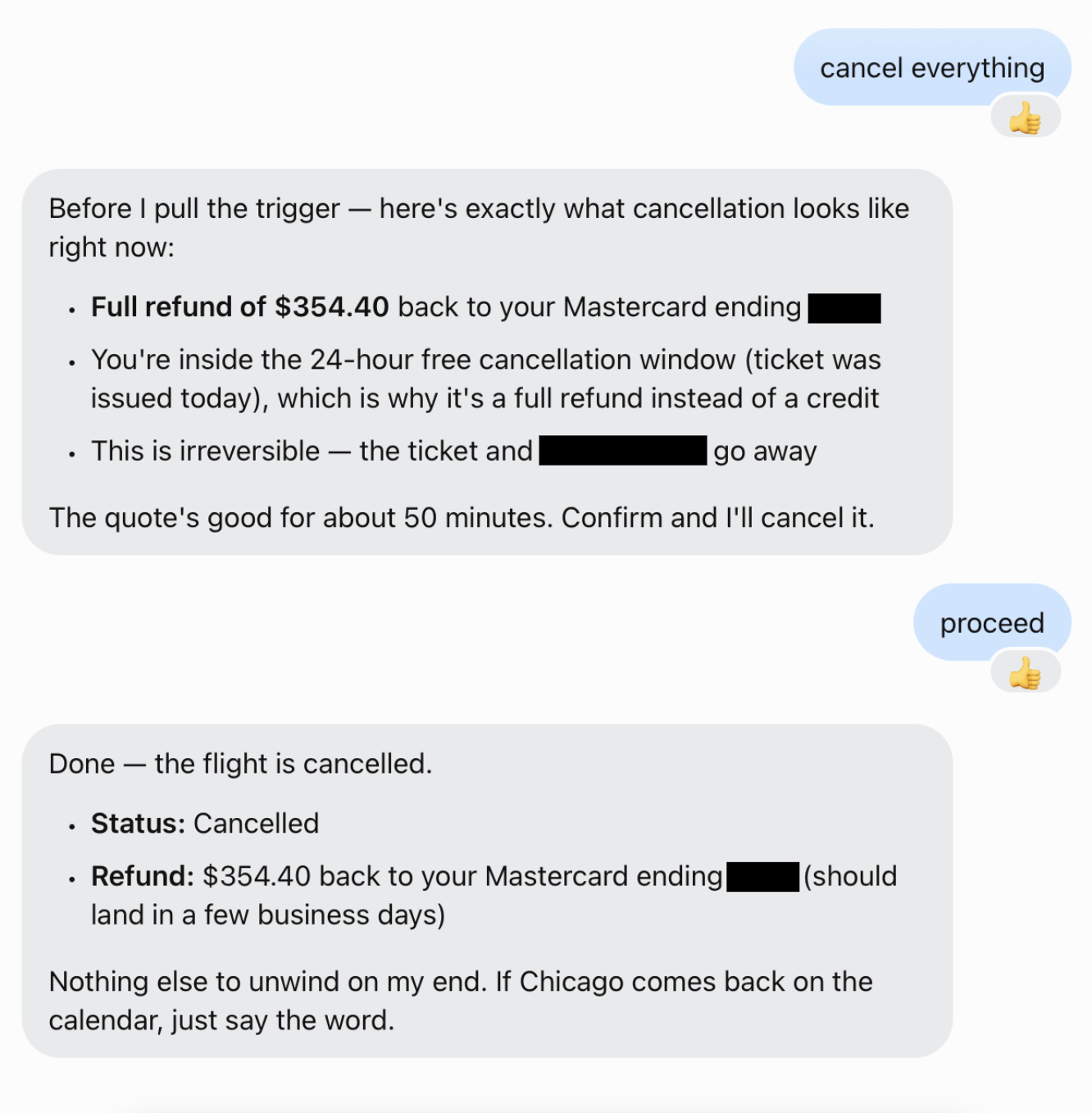
cancel everything
Muse
Before I pull the trigger — here's exactly what cancellation looks like right now: Full refund of $354.40 back to your Mastercard ending [card 4 ending redacted] You're inside the 24-hour free cancellation window (ticket was issued today), which is why it's a full refund instead of a credit This is irreversible — the ticket and PNR [booking reference redacted] go away The quote's good for about 50 minutes. Confirm and I'll cancel it.
Tester
proceed
Muse
Done — the flight is cancelled. Status: Cancelled Refund: $354.40 back to your Mastercard ending [card 4 ending redacted] (should land in a few business days) Nothing else to unwind on my end. If Chicago comes back on the calendar, just say the word.